

Deploy executors
Executors run resource-intensive or untrusted jobs for precise code navigation and Batch Changes. This guide helps self-hosted operators choose a deployment method and prepare the infrastructure that executors require.
For feature concepts, Sourcegraph configuration, connected instance management, and executor secrets, see Administer executors.
Prepare to deploy executors
Complete these prerequisites before deploying executor infrastructure:
- Confirm version compatibility. Run the same major and minor version of the executor as your Sourcegraph Enterprise instance.
- Configure authentication to your Sourcegraph instance. Complete Setting up executors to create the shared authentication secret. The guide for your deployment method explains how to provide that secret to the executor.
- Confirm network connectivity. Executor infrastructure must be able to reach the Sourcegraph frontend.
- Provide a supported runtime. Current executor deployments require a Linux AMD64 (
x86_64) environment. - Plan executor capacity. Size CPU, memory, and disk for the number and type of concurrent jobs. See Plan executor capacity.
Choose a deployment method
The primary decision is whether jobs require a virtual-machine isolation boundary.
- Use Firecracker for the strongest supported job isolation. Choose a Terraform deployment on AWS or Google Cloud, or install the Linux binary on compatible infrastructure. Firecracker requires KVM: AWS uses bare-metal instances, while Google Cloud supports nested virtualization.
- Use Docker when KVM is unavailable and privileged container execution is acceptable. Install the Linux binary in Docker mode or use Docker Compose.
- For Kubernetes deployments, prefer Docker-in-Docker. Docker-in-Docker is the preferred option when running executors in an existing Kubernetes cluster. It remains in beta and does not provide the same MicroVM isolation boundary as Firecracker. Native Kubernetes executors are being deprecated.
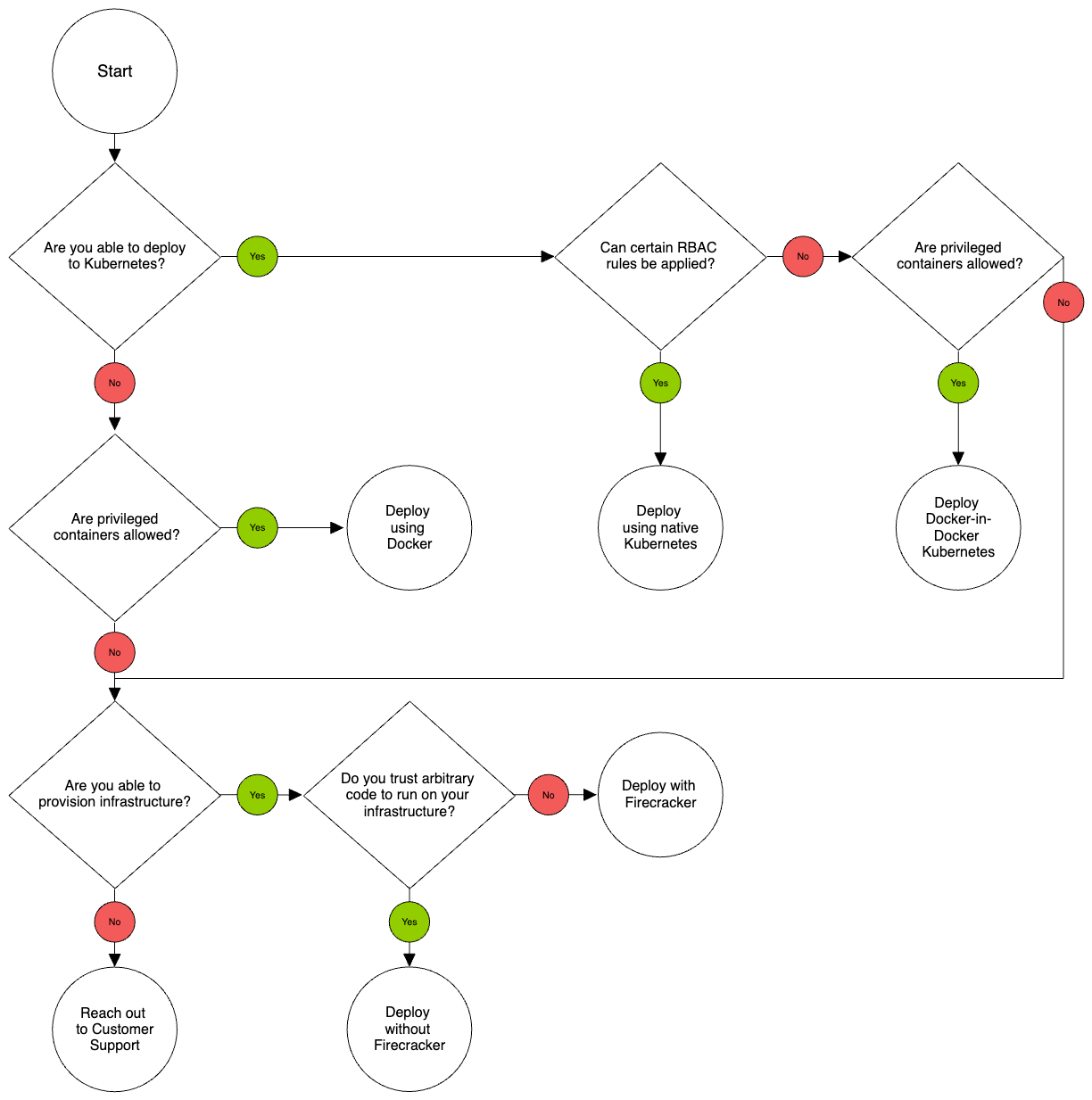
Executors run untrusted repository code and build tooling. Deployment methods without Firecracker do not provide a MicroVM boundary. Isolate executor hosts or nodes from sensitive workloads, restrict access to private networks and cloud metadata services, and use disposable compute where possible.
Recommended deployment methods
Terraform on AWS
Provision autoscaling, Firecracker-capable executors and supporting AWS infrastructure.
Terraform on Google Cloud
Provision autoscaling executors with nested virtualization on Google Cloud.
Linux binary
Install an executor directly on a Linux host, with Firecracker or Docker isolation.
Offline Linux binary
Install the executor and its dependencies in an air-gapped environment.
Docker Compose
Run an executor as a privileged container without Firecracker isolation.
Kubernetes deployment methods
Docker-in-Docker on Kubernetes (Beta)
Run Docker jobs through a privileged sidecar in an isolated Kubernetes node pool.
Native Kubernetes (Beta)
Run each job step as a Kubernetes Job. This deployment method is being deprecated.
Validating executor deployments
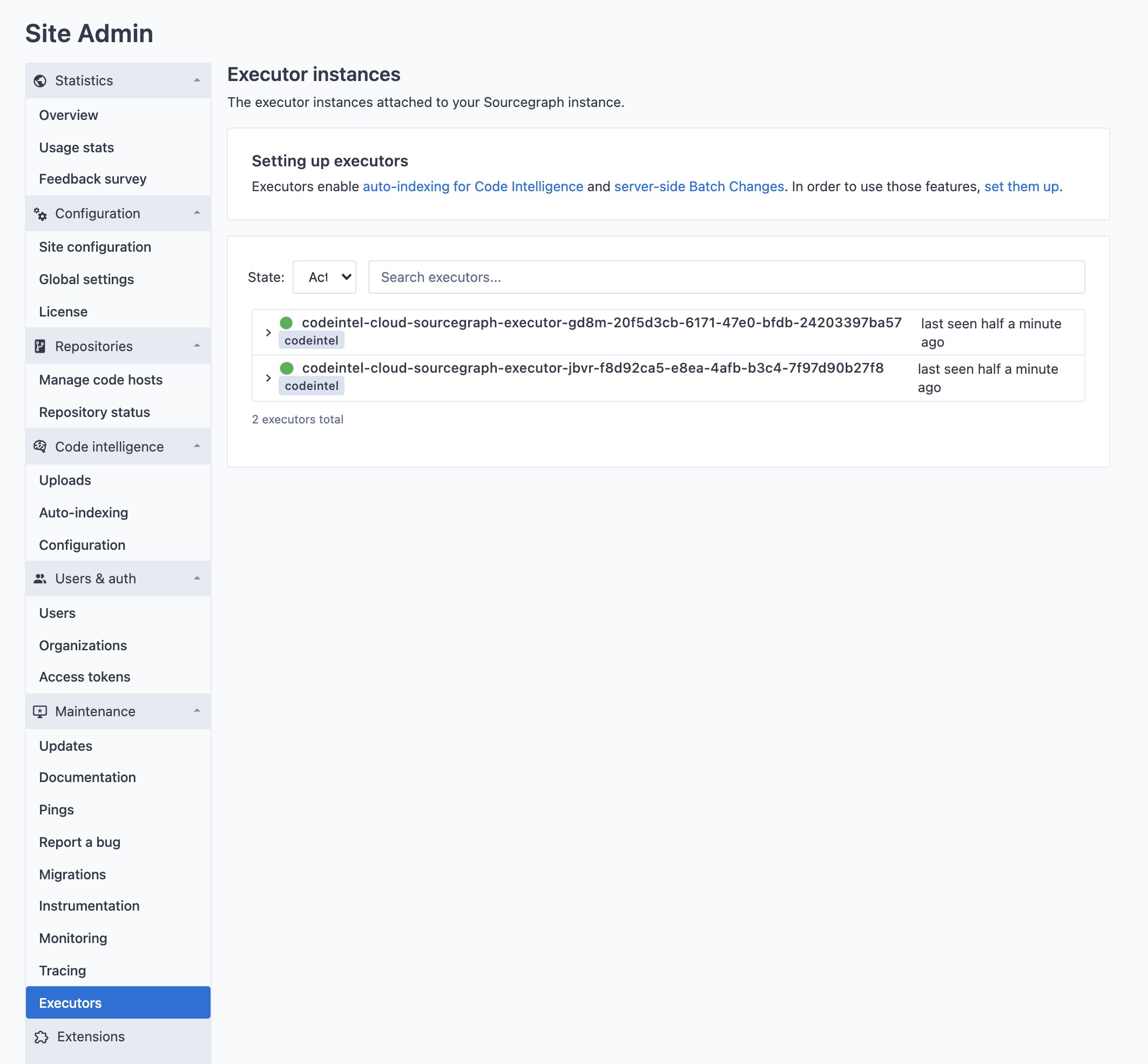
Follow the validation steps in the guide for your selected deployment method. After the executor starts, confirm that it is active and reporting the expected version under Site admin > Maintenance > Executor instances.
Configure and operate executors
Private container registries
Configure authentication for images stored in private container registries.
Custom certificates
Configure executors to trust private certificate authorities.
Executor configuration reference
Review executor environment variables and runtime configuration.
Troubleshoot executors
Diagnose connectivity, runtime, scheduling, and isolation problems.
For details about the strongest supported job-isolation boundary, see Firecracker isolation and caveats.